Sends that respect your limits
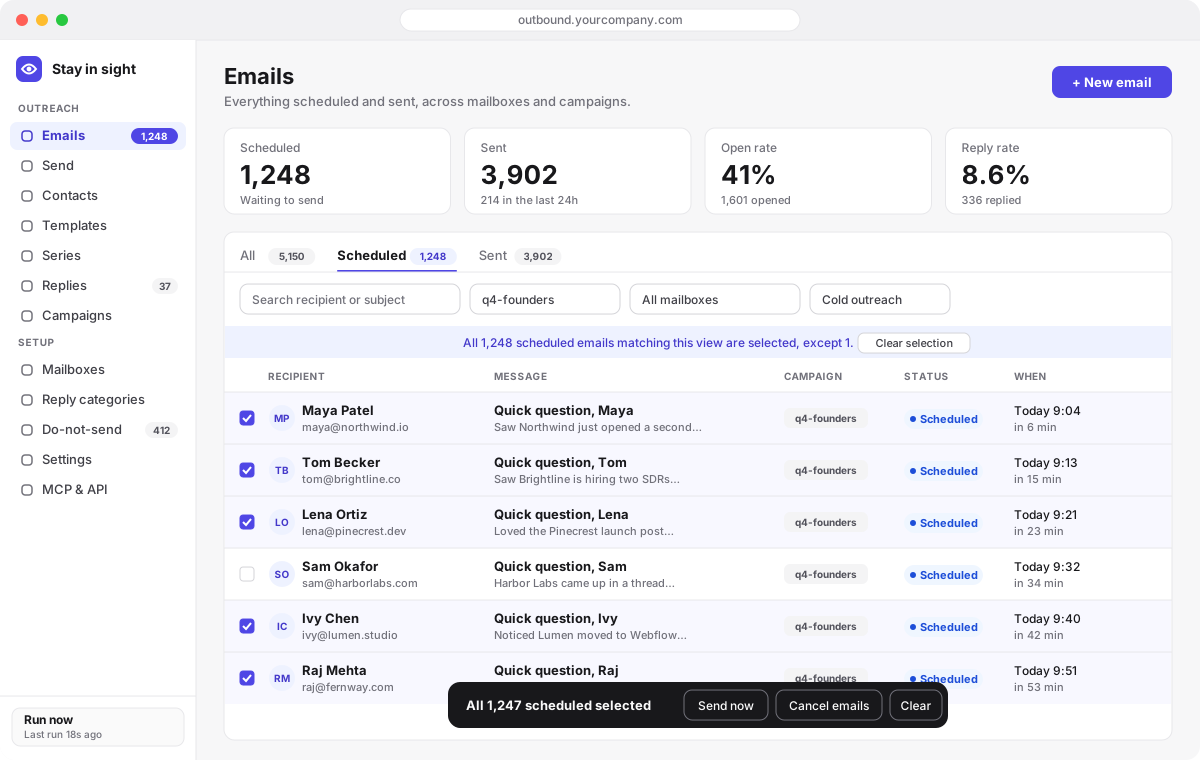
Every email is queued with a send time. A per-minute run sends what’s due within each mailbox’s daily limit and spacing, and auto-send spreads a big batch across as many days as it takes.
Open source · MIT · runs on Cloudflare Workers
Cold outreach, newsletters and drip series from your real Gmail and SES mailboxes. Every contact, email and reply lives in your own database, and an AI agent can run all of it.
No seats. No per-contact pricing. Cloudflare’s free plan works at low volume.
One Worker, one database, one passcode. Here is what’s inside.
Every email is queued with a send time. A per-minute run sends what’s due within each mailbox’s daily limit and spacing, and auto-send spreads a big batch across as many days as it takes.
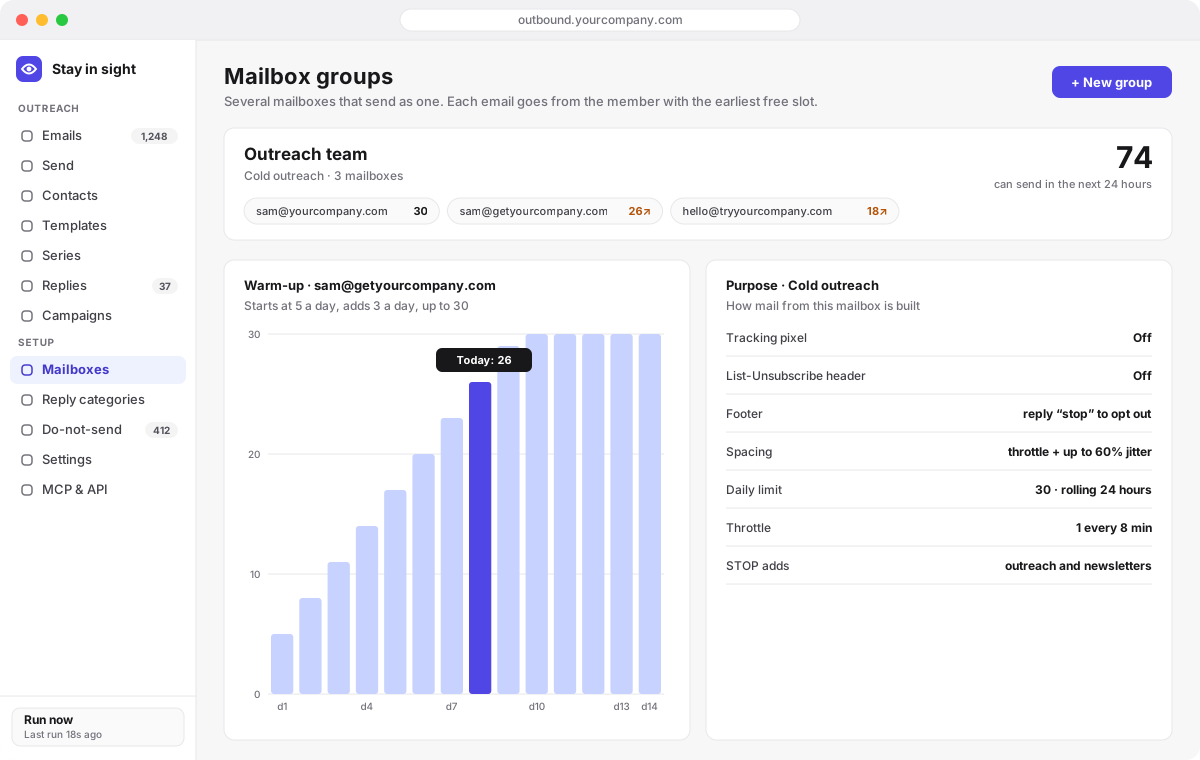
New mailboxes start at a few emails a day and climb to their limit on a schedule you set.
Several mailboxes send as one. Each email goes from the member with the earliest free slot, and follow-ups stay with the same address.
A model rewrites each email for its recipient just before sending, from their contact data and your instructions, and can skip people.
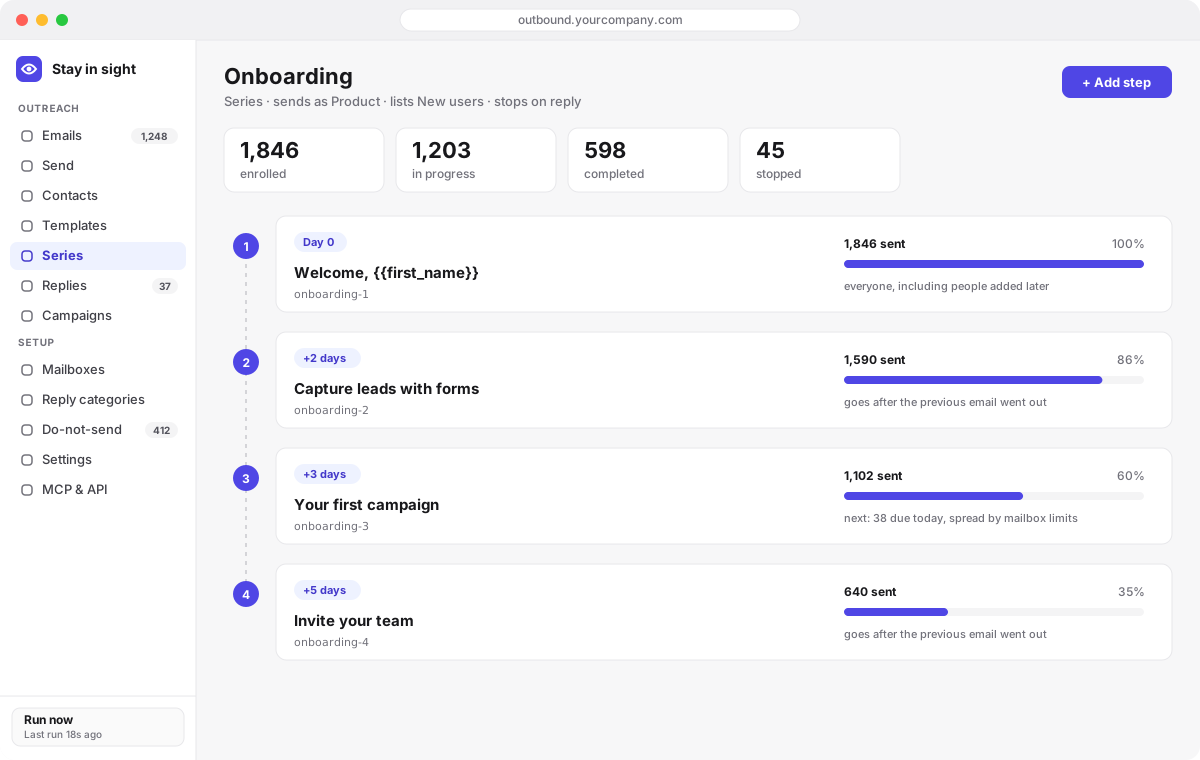
Template steps days apart, sent to everyone on a list, including people added later. Add steps any time.
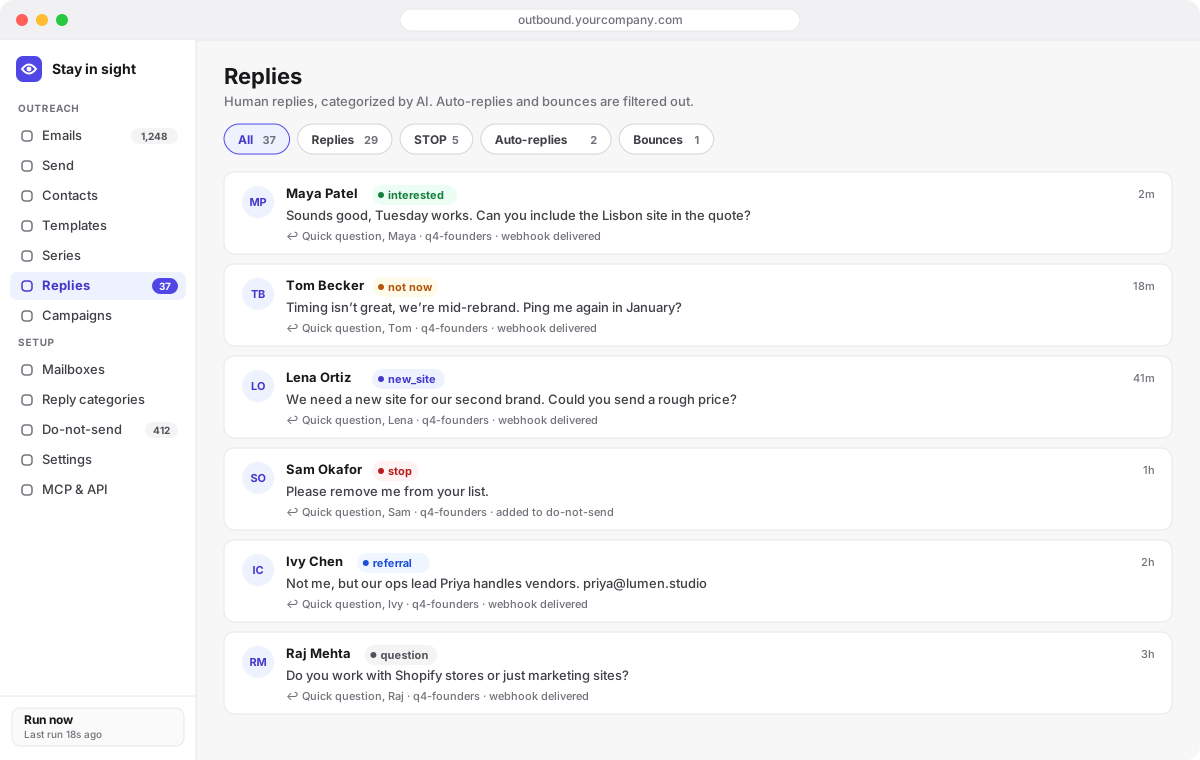
Replies are detected every minute or instantly with Gmail push, stripped of quoted history, categorized by AI against your own categories, and posted to your webhook with the whole thread.
STOP replies, unsubscribes, hard bounces and complaints are honoured automatically, scoped by mailbox purpose.
A template reaches an address once, enforced by the database. Re-send to a growing list and only new people get it.
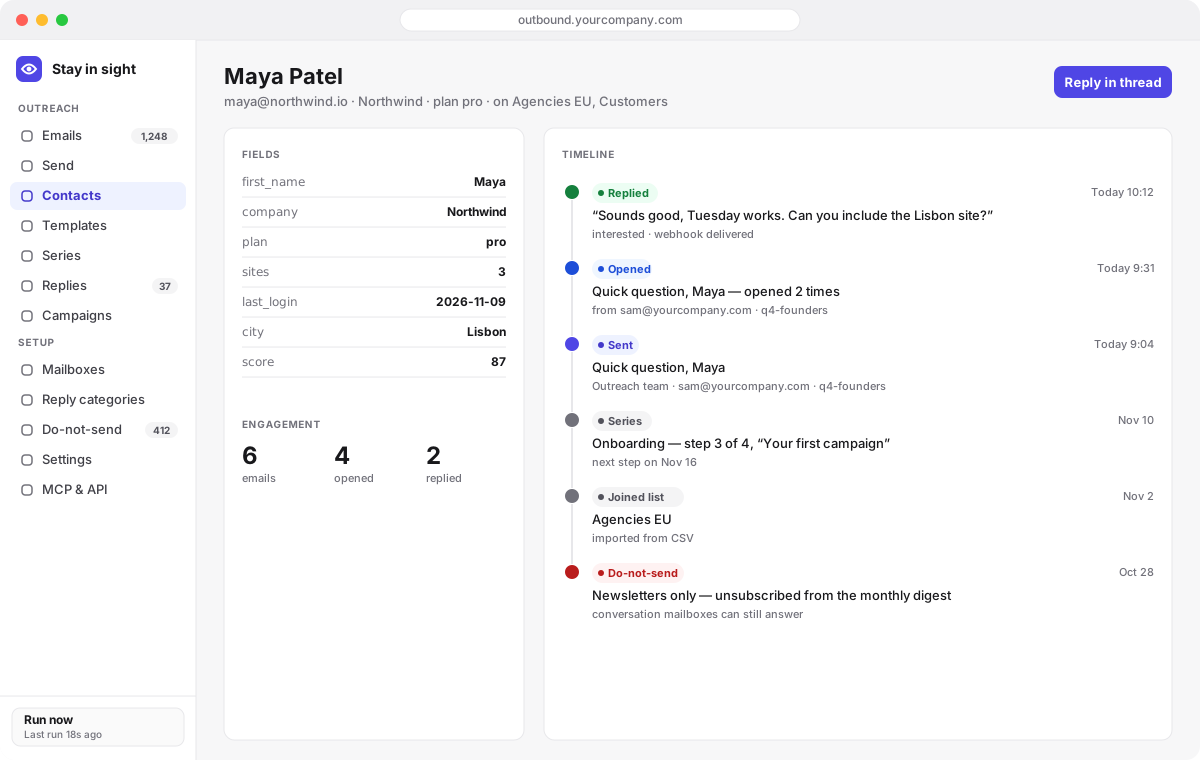
Every email, open, reply, list and series step for one address, across every mailbox, on one page.
Send to lists
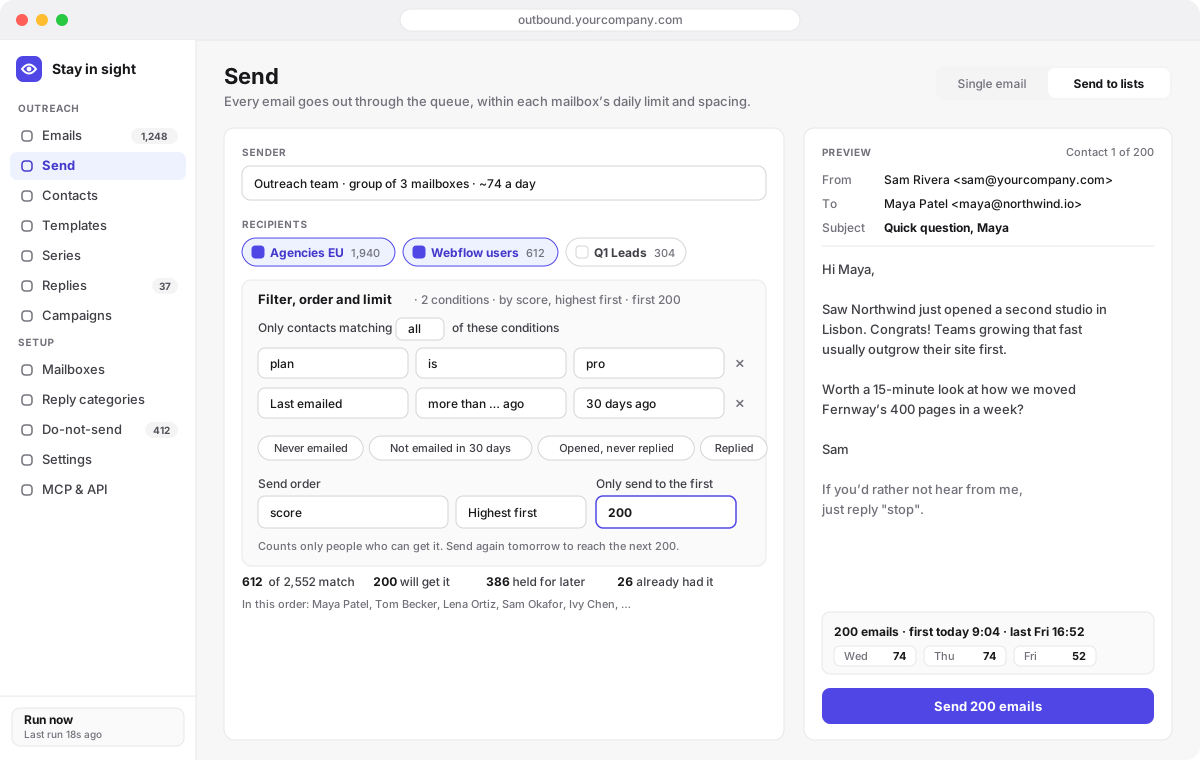
Send to one or more lists, narrowed with the same conditions as the Contacts page, ordered by any field, and capped at the first N. The preview shows who gets it, who’s skipped and why, and the day-by-day plan before anything is queued.
AI personalization
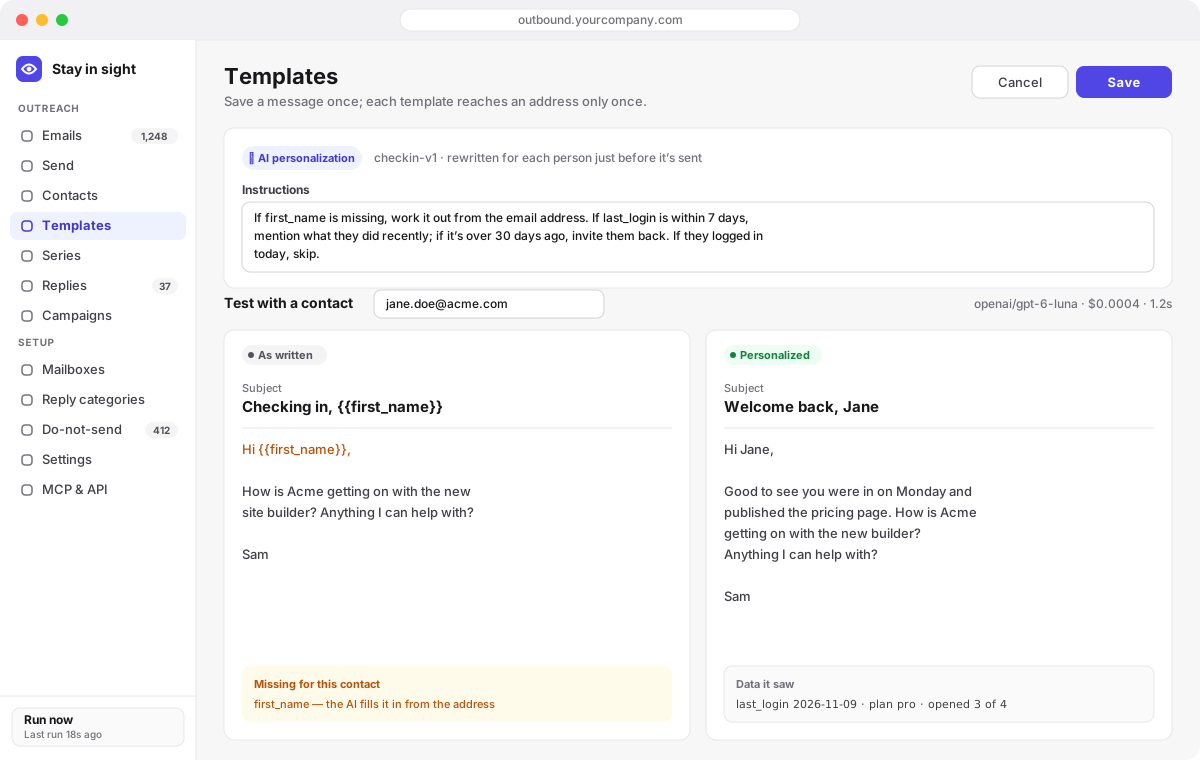
Turn on AI for a template and write instructions in plain words. Just before each email goes out, a model rewrites it using that person’s data at that moment: their fields, lists, opens and replies. Test it on a real contact first and see the cost per email.
Warm-up and mailbox groups
Group several mailboxes and send through the group. Each email goes from the member with the earliest free slot by its own limit, spacing and warm-up. Each mailbox has a purpose — cold outreach, newsletter or conversation — that decides how its mail is built.
Series
Attach lists to a series and everyone on them works through the steps, a set number of days apart. Your app enrolls people by adding them to a list. New steps reach everyone who hasn’t had them, even people who had finished.
Replies and webhooks
Each human reply is categorized against categories you define, like interested, not now or referral, with your outreach context in the prompt. Auto-replies and bounces are filtered out. Your webhook gets the category, the whole conversation and the metadata you sent with the email.
Person timeline
Open any address to see every email from any mailbox, sender, list send or series, with opens, replies, list joins, series progress and do-not-send changes, newest first. It works for addresses that aren’t contacts too.
Each mailbox declares what it’s for, and the mail it sends is built to match. You don’t need a separate tool for newsletters or for talking to customers.
One-to-one emails to people who haven’t heard from you.
Bulk mail to people who signed up.
Back-and-forth with people who wrote to you.
MCP
Point Claude, Cursor or any MCP client at your deployment and it can do everything you can in the app: import contacts, write templates, preview a send, schedule it through a group, read the replies and answer them in the thread.
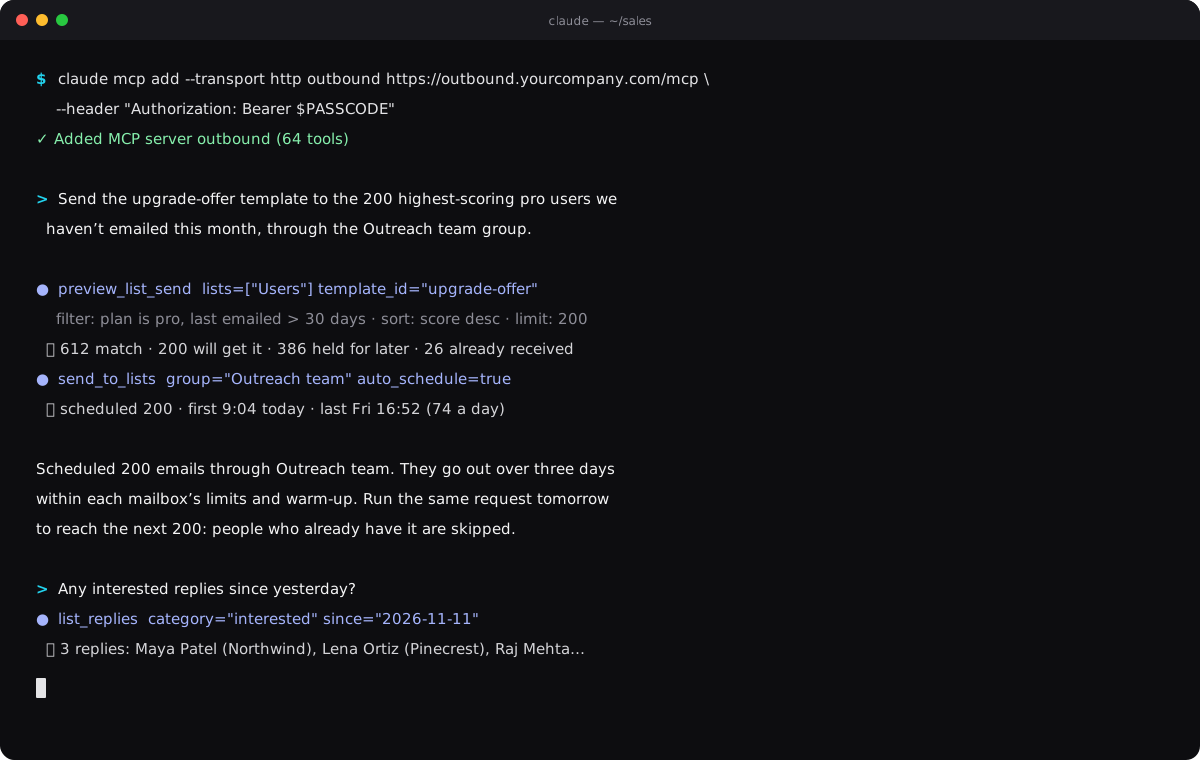
claude mcp add --transport http outbound https://<your-worker>/mcp \
--header "Authorization: Bearer <PASSCODE>"You need a Cloudflare account and a Google account to send from. Everything else is optional.
One D1 database holds everything: contacts, emails, replies, settings.
git clone https://github.com/yusufnb/stay-in-sight
cd stay-in-sight && npm install
npx wrangler d1 create cms-outbound
npm run db:migrateThe passcode protects the app, the API and MCP. It’s the only setting you can’t change in the app later.
npx wrangler secret put PASSCODE
npm run deployCreate a Google OAuth client with the Gmail API, paste it into Settings, and click Connect Google mailbox. Add an OpenRouter key for AI, and SES for newsletters, whenever you like.
# redirect URI shown in the app:
https://<your-worker>/oauth/google/callbackFull walkthrough, including Gmail push, SES and one-command tenant deploys: the setup guide.
Hosted tools like lemlist, Instantly and Smartlead are faster to start and come with lead databases and warm-up networks. Stay in sight trades those for ownership, no seat pricing and an agent-first API.
| Stay in sight | lemlist | Instantly | Smartlead | |
|---|---|---|---|---|
| Where your data lives | Your own Cloudflare D1 database | Vendor cloud | Vendor cloud | Vendor cloud |
| How you pay | Nothing for the software; hosting from $0 | Monthly, per user | Monthly plans | Monthly plans |
| Source code | Open, MIT licensed | Closed | Closed | Closed |
| Agent access | 64-tool MCP server + REST API | API | API | API |
| Newsletters with one-click unsubscribe | Yes, newsletter mailboxes | Not the focus | Not the focus | Not the focus |
| Built-in lead database | No, bring your own | Yes | Yes | Yes |
| Warm-up | Volume ramp only | Engagement network | Engagement network | Engagement network |
The software is MIT licensed and costs nothing. You pay Cloudflare for hosting (the free plan works at low volume; Workers Paid is $5 a month), your existing Gmail or Workspace, and, if you use them, Amazon SES and an OpenRouter model for AI.
Gmail mailboxes connect with OAuth and send through the Gmail API, so emails sit in your Sent folder and replies thread normally. SES mailboxes send through SES’s API, with tracked reply addresses routed back to the Worker by Cloudflare Email Routing.
It is built to avoid that: per-mailbox daily limits and spacing that are always on, warm-up, jittered spacing for cold outreach, no tracking pixel on cold mail, one-click unsubscribe on newsletters, and automatic do-not-send for STOP replies, bounces and complaints. Your sending practices still matter most.
It has one passcode for the app, the API and MCP, so it suits a founder, a small team sharing access, or an agent. There are no per-user roles. Deploy a separate tenant per client with one command if you run outreach for others.
Bring your own: import a CSV, or have your app or agent add contacts through the API or MCP with any fields you like. Every field becomes a {{variable}} and is visible to AI personalization.
Add the /mcp endpoint to Claude Code, Cursor or any MCP client with your passcode as a Bearer token. Agents can preview and schedule sends, manage lists and series, read categorized replies and answer them in the thread.
Deploy it to your own Cloudflare account today. Your mailboxes, your data, your rules.